
Process map · Any company
Asset lifecycle, step by step
The asset lifecycle is everything that happens to a vehicle, machine, computer or piece of furniture the company owns: buying it, putting it on the books, depreciating it, moving it, maintaining it and finally selling or scrapping it. It usually hurts at audit time, when the register in accounts and the things actually in the building turn out to be two different lists. In ERPNext the asset record is created from the purchase itself, depreciation posts on its own, and every move and repair is written on the same record.
The full map is free
14 steps, 2 decisions, 2 roads into other maps. Sign in once to open every approval and branch, larger ERPNext screens and a printable sheet.
Select a step to see who does it, the document and the ERPNext screen.
Step by step
-
The approved request becomes a Purchase Order to the chosen supplier. When the asset arrives it is received on a Purchase Receipt, or directly on the Purchase Invoice, as a fixed asset item.
- Who does it
- Buyer
- Document that comes out
- Purchase Order
ERPNext then does this by itself
- The cost is posted to fixed assets, not to stock or expenses
- A draft Asset record is created for each unit received, when the item is set to create assets on purchase
Without an ERP
The invoice for a new machine is booked as a repair expense. Profit for the month is understated, and the machine never reaches the asset register at all.
-
The accountant completes the Asset record that the purchase created: its category, location, custodian and the date it is ready for use. Submitting the record capitalises the asset and puts it on the register.
- Who does it
- Accountant
- Document that comes out
- Asset
ERPNext then does this by itself
- The purchase value comes from the purchase document
- Depreciation method and useful life come from the asset category
- Each asset gets its own number for tagging
Without an ERP
The register is a spreadsheet updated once a year from the invoice files. Half the laptops on it left with former employees, and the auditor cannot find the rest.
-
ERPNext builds a depreciation schedule for the asset: one line for each period of its useful life. On each due date the depreciation entry is posted by the system. The accountant only reviews it.
- Who does it
- Accountant
- Document that comes out
- Asset Depreciation Schedule
ERPNext then does this by itself
- A Journal Entry is posted for each line of the schedule when it falls due
- The asset's book value goes down with every entry
- The Balance Sheet shows cost less accumulated depreciation
Without an ERP
Depreciation is one large journal at year end, worked out in a spreadsheet. Monthly profit looks better than it is for eleven months and then drops in the twelfth.
-
When an asset goes to another branch, room or person, an Asset Movement records it: a transfer between locations, an issue to an employee, or a return. The register always says where the asset is and who answers for it.
- Who does it
- Department head
- Document that comes out
- Asset Movement
ERPNext then does this by itself
- Location and custodian change on the asset record
- Every earlier move stays in the asset's history
Without an ERP
A projector is lent to another branch for a week and stays for two years. At the count nobody knows where it is, and a new one has already been bought.
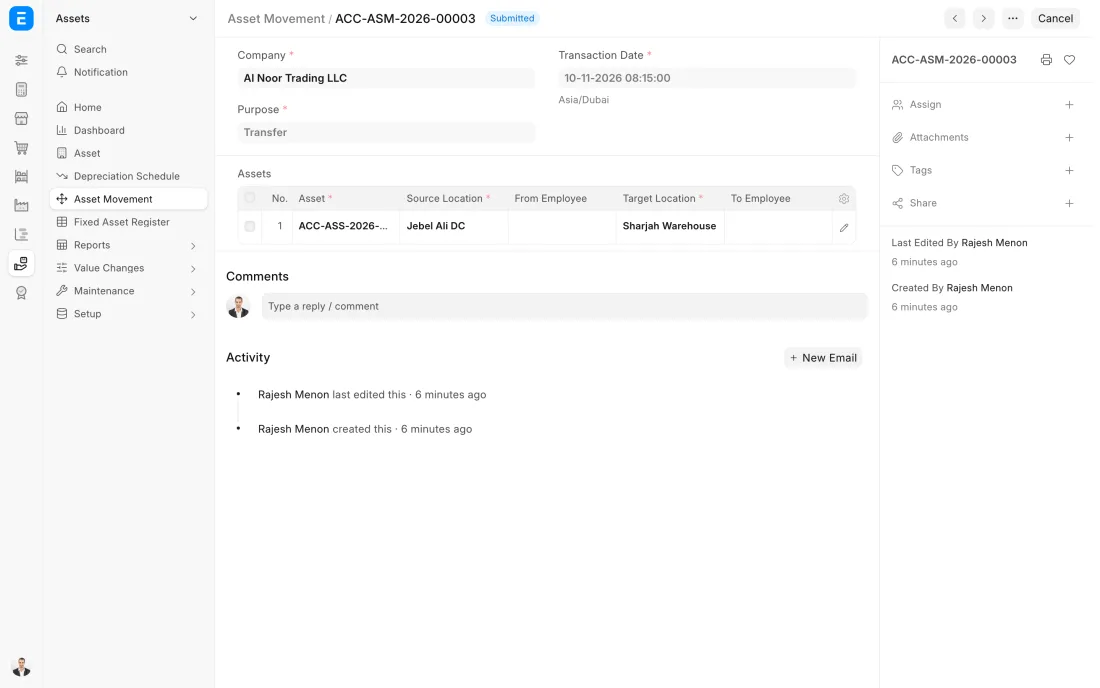
ERPNext 16 · Asset Movement -
Assets that need regular care get a maintenance plan: a list of tasks, how often each is due and who does it. ERPNext keeps a log of what is due, what is done and what is overdue.
- Who does it
- Maintenance supervisor
- Document that comes out
- Asset Maintenance Log
ERPNext then does this by itself
- The next due date is worked out after each completed task
- The person assigned is reminded of the task
- Overdue tasks are marked
Without an ERP
Servicing depends on someone remembering. The generator is serviced when it fails, on the one day the power is out.
-
At the end of its life the asset is sold or scrapped. A sale is a Sales Invoice with the asset on its line. An asset with no value left is scrapped from its own record. Either way it leaves the register on that date.
- Who does it
- Accountant
- Document that comes out
- Sales Invoice
ERPNext then does this by itself
- Depreciation is posted up to the day of disposal
- Cost and accumulated depreciation are taken off the books
- The gain or loss on disposal is posted to its own account
Without an ERP
An old vehicle is sold for cash and the money is booked as other income. The vehicle stays on the register and keeps depreciating for three more years.
The Full map adds 8 more steps: the approvals, checks and branches between these.
A company buys a delivery van. The purchase creates the asset record, depreciation is posted every month without anyone touching it, the van moves from the Dubai branch to Abu Dhabi, and five years later it is sold with the gain worked out by the system.
Where this map leads
Processes feed each other. Follow the work into the next map.
Free tool
Build your company's map
Pick your industry and the processes you run. Get one printable document with every map and step, ready to show your team or your ERP partner.
- Asset lifecycle
- Order to cash
- Purchase to pay
- Plan to produce
- Project to bill
Questions about asset lifecycle
Ask us anything elseWhat is the asset lifecycle?
Does ERPNext post depreciation automatically?
Which depreciation methods does ERPNext support?
How do I record the sale of a fixed asset in ERPNext?
What is the difference between a fixed asset and a stock item in ERPNext?
See this process run on your own data
A 45-minute ERPNext demo that follows this map with an example from your business.