
Process map · Construction
Asset lifecycle in a construction company
A contractor's assets do not stay in one place. Excavators, generators, scaffolding and vehicles move from site to site, and every project manager wants to know what plant they have and what it costs their job. Add hired equipment, which must not be mixed up with owned, and documents such as registrations and insurance that expire. This map follows plant and equipment in a contracting company on ERPNext.
The full map is free
16 steps, 2 decisions, 3 roads into other maps. Sign in once to open every approval and branch, larger ERPNext screens and a printable sheet.
Select a step to see who does it, the document and the ERPNext screen.
Step by step
-
The approved request becomes a Purchase Order to the chosen supplier. When the asset arrives it is received on a Purchase Receipt, or directly on the Purchase Invoice, as a fixed asset item.
- Who does it
- Buyer
- Document that comes out
- Purchase Order
ERPNext then does this by itself
- The cost is posted to fixed assets, not to stock or expenses
- A draft Asset record is created for each unit received, when the item is set to create assets on purchase
Without an ERP
The invoice for a new machine is booked as a repair expense. Profit for the month is understated, and the machine never reaches the asset register at all.
-
The accountant completes the Asset record that the purchase created: its category, location, custodian and the date it is ready for use. Submitting the record capitalises the asset and puts it on the register.
- Who does it
- Accountant
- Document that comes out
- Asset
ERPNext then does this by itself
- The purchase value comes from the purchase document
- Depreciation method and useful life come from the asset category
- Each asset gets its own number for tagging
Without an ERP
The register is a spreadsheet updated once a year from the invoice files. Half the laptops on it left with former employees, and the auditor cannot find the rest.
-
ERPNext builds a depreciation schedule for the asset: one line for each period of its useful life. On each due date the depreciation entry is posted by the system. The accountant only reviews it.
- Who does it
- Accountant
- Document that comes out
- Asset Depreciation Schedule
ERPNext then does this by itself
- A Journal Entry is posted for each line of the schedule when it falls due
- The asset's book value goes down with every entry
- The Balance Sheet shows cost less accumulated depreciation
Without an ERP
Depreciation is one large journal at year end, worked out in a spreadsheet. Monthly profit looks better than it is for eleven months and then drops in the twelfth.
-
When plant leaves one site for another, an Asset Movement records the transfer with the date. The receiving site becomes its location and the foreman or operator there becomes its custodian.
- Who does it
- Plant manager
- Document that comes out
- Asset Movement
ERPNext then does this by itself
- Location and custodian change on the asset record
- Every earlier move stays in the asset's history
Without an ERP
Scaffolding and small plant leave on any truck going that way. At the end of the job a third of it is missing, and no site admits to having it.
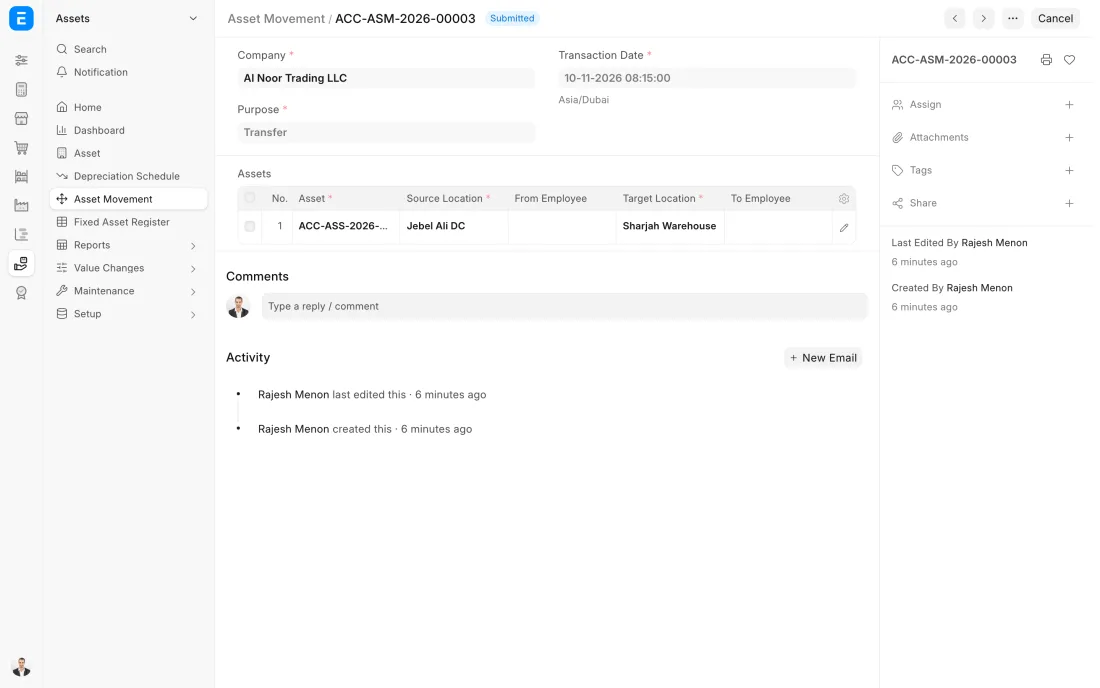
ERPNext 16 · Asset Movement -
Each machine has its service tasks with how often they are due. Insurance details are on the asset record, and registration and inspection certificates are attached to it. Reminders can be set up before any of them expires.
- Who does it
- Plant manager
- Document that comes out
- Asset Maintenance Log
ERPNext then does this by itself
- The next due date is worked out after each completed task
- The person assigned is reminded of the task
- Overdue tasks are marked
Without an ERP
A truck's registration runs out while it is working on a remote site. It is stopped on the road, and the site loses two days waiting for a replacement.
-
At the end of its life the asset is sold or scrapped. A sale is a Sales Invoice with the asset on its line. An asset with no value left is scrapped from its own record. Either way it leaves the register on that date.
- Who does it
- Accountant
- Document that comes out
- Sales Invoice
ERPNext then does this by itself
- Depreciation is posted up to the day of disposal
- Cost and accumulated depreciation are taken off the books
- The gain or loss on disposal is posted to its own account
Without an ERP
An old vehicle is sold for cash and the money is booked as other income. The vehicle stays on the register and keeps depreciating for three more years.
The Full map adds 10 more steps: the approvals, checks and branches between these.
A contractor needs a second excavator for three months. It is hired, with the cost booked to the project. The company's own excavator moves from the finished site to the new one the same week, and the register shows which machine is where.
What changes in a construction company. The same process, the steps this industry really uses.
-
Assets move between sites
Each site is a location. Every time plant moves, an Asset Movement records it, so the register shows what each site holds today and where each machine has been.
-
Hired and owned are kept apart
Hired equipment is ordered as a service with the project set and never enters the asset register. Owned plant is an asset with a value and depreciation. Nobody depreciates a hired crane or forgets to return it.
-
Projects carry the cost of the plant they use
Depreciation is posted to the asset's own cost centre. Charging owned plant to each project, for example at an internal daily rate, can be set up so that job costing includes it.
-
Documents have expiry dates
Insurance details are kept on the asset record, and registration and inspection certificates can be attached to it. Reminders can be set up before each one expires.
Where this map leads
Processes feed each other. Follow the work into the next map.
Free tool
Build your company's map
Pick your industry and the processes you run. Get one printable document with every map and step, ready to show your team or your ERP partner.
- Asset lifecycle
- Purchase to pay
- Project to bill
- Hire to retire
- Inventory management
Questions about asset lifecycle
Ask us anything elseHow do I track equipment across construction sites in ERPNext?
Should hired equipment be recorded as an asset?
Can ERPNext charge equipment costs to projects?
See this process run on your own data
A 45-minute ERPNext demo that follows this map with an example from your business.