
Process map · Any company
Returns and credit notes, step by step
A return runs the sale backwards: goods come into the store, the invoice is reversed with a credit note, and the customer gets money back or credit on the account. It goes wrong when the two halves separate, so that stock comes back with no credit note, or a credit is given for goods that never arrived. In ERPNext the return is made from the original delivery and invoice, so quantities, prices and VAT match what was sold.
The full map is free
14 steps, 3 decisions, 1 road into another map. Sign in once to open every approval and branch, larger ERPNext screens and a printable sheet.
Select a step to see who does it, the document and the ERPNext screen.
Step by step
-
The customer asks to send goods back: the wrong item, damaged, faulty or simply not needed. The request is logged against the customer as an Issue, with the original delivery note, the quantity and the reason.
- Who does it
- Salesperson
- Document that comes out
- Issue
ERPNext then does this by itself
- Emails to and from the customer are kept on the record
- The request stays open until someone closes it
Without an ERP
The customer tells the driver, the driver tells the store, and the goods arrive back unannounced. Nobody in sales or accounts knows why they are there.
-
The storekeeper opens the original Delivery Note and makes a return from it, with the quantity that actually came back. It is a delivery note with the quantities reversed, usually into a separate returns warehouse.
- Who does it
- Storekeeper
- Document that comes out
- Delivery Note (return)
ERPNext then does this by itself
- Stock goes up at the cost it went out at
- More cannot be returned than was delivered
- The original delivery shows how much has come back
Without an ERP
Returned cartons are left near the loading bay. They are not on the stock sheet, so they are neither sold nor credited, and at the year-end count nobody knows whose they are.
-
Each returned item is examined: is it what was sold, is it unused, is the packaging intact, is the fault real. The finding is written on the return, because it decides both what happens to the goods and how much is credited.
- Who does it
- Storekeeper or quality inspector
ERPNext then does this by itself
- Returned stock shows under its own warehouse, apart from stock for sale
Without an ERP
Returns are put straight back on the shelf unchecked. A damaged unit is sold again to the next customer, who returns it too.
-
Accounts make the credit note from the original Sales Invoice, for the quantity the store received back. Items, prices and VAT come from that invoice, so the customer is credited exactly what they were charged.
- Who does it
- Accountant
- Document that comes out
- Sales Invoice (credit note)
ERPNext then does this by itself
- Sales, VAT and what the customer owes are reduced
- The credit note names the original invoice and carries the TRN
- The credit shows on the customer's statement at once
Without an ERP
Credit notes are typed in a word processor from memory. The price is today's, not the one charged, the VAT is wrong, and the store never confirmed the goods came back.
-
If the original invoice is still unpaid, the credit note is matched against it in the Payment Reconciliation tool and the customer simply owes less. If it was paid, accounts refund the money with a Payment Entry, or leave the credit on the account and match it to the next invoice.
- Who does it
- Accountant
- Document that comes out
- Payment Entry
ERPNext then does this by itself
- The customer's balance and credit room update at once
- Credits not yet used are listed until they are matched or refunded
Without an ERP
A credit is promised but never applied. The customer short-pays the next invoice by their own figure, and the two sets of books never agree again.
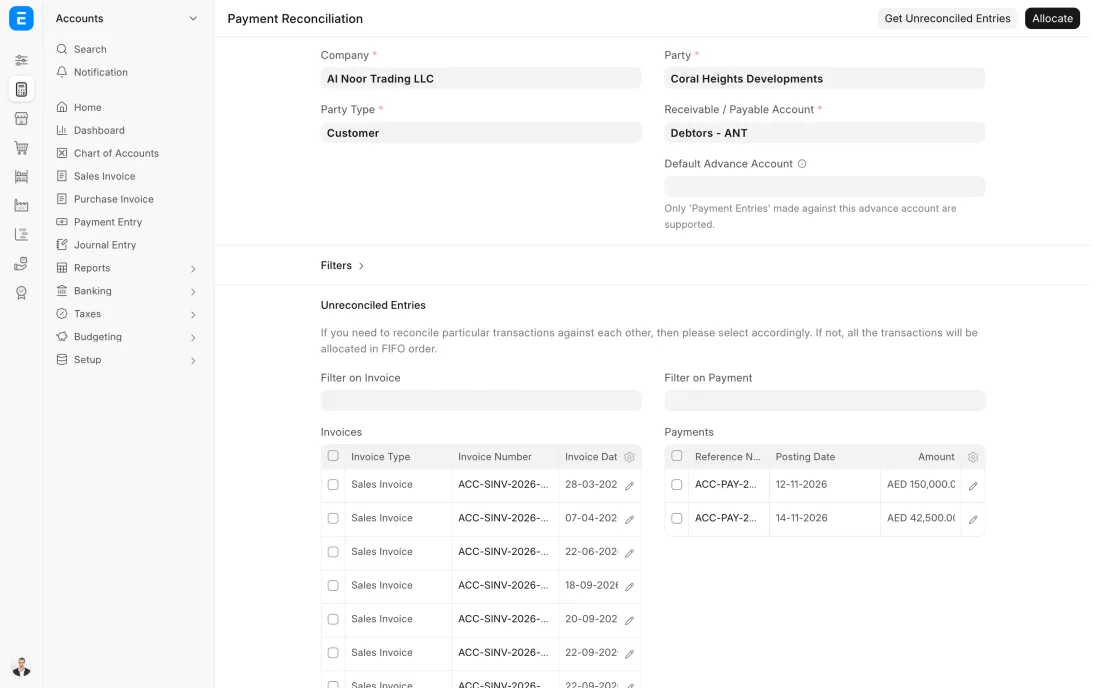
ERPNext 16 · Payment Reconciliation
The Full map adds 9 more steps: the approvals, checks and branches between these.
A customer sends back 5 of the 20 fire hoses they bought because the couplings are the wrong size. The store takes them in against the original delivery, finds them unused and puts them back on the shelf, and the credit note is set off against the customer's next invoice.
Where this map leads
Processes feed each other. Follow the work into the next map.
Free tool
Build your company's map
Pick your industry and the processes you run. Get one printable document with every map and step, ready to show your team or your ERP partner.
- Returns and credit notes
- Order to cash
- Purchase to pay
- Plan to produce
- Project to bill
Questions about returns and credit notes
Ask us anything elseWhat is the difference between a credit note and a debit note?
How do I create a credit note in ERPNext?
Can we issue a credit note without the goods coming back?
How does a credit note affect VAT in the UAE?
See this process run on your own data
A 45-minute ERPNext demo that follows this map with an example from your business.